
ማብራሪያ
Style the Ultimate Member pages you already have.
If your site runs Ultimate Member, the default login, register, directory, and profile pages rarely match the rest of the design. This plugin adds Elementor widgets for those pages so you can change colors, typography, spacing, cards, and fields visually — without custom CSS and without rebuilding the site.
Works with the free version of Elementor. Elementor Pro is not required. Built specifically for Ultimate Member.
Live Demos | Go Pro | Documentation
Why site owners install this plugin
- Style the login page in Elementor — Replace the default Ultimate Member login form with a branded layout visitors will trust.
- Style the register page the same way — One widget handles both login and register. Field layout, buttons, labels, and spacing stay in the editor.
- Build a searchable member directory — AJAX live search, role or custom field filters, and card or list layouts.
- Keep editing in Elementor — Change colors, typography, spacing, cards, and fields visually without custom CSS.
- Use your existing Ultimate Member pages — Drop widgets onto the login, register, password reset, and members pages you already mapped in Ultimate Member.
What the free version includes
Login, register, and password reset in Elementor
- Login / Register Form widget for Ultimate Member forms
- Password Reset widget
- Logout widget
- Field layout controls: multi-column rows, reorder fields, hide labels, control gaps
- Visual styling for buttons, inputs, labels, spacing, borders, shadows, colors, and typography
Member directory and user listings
- Directory Grid with AJAX live search
- Filter by role or custom Ultimate Member fields
- Card, list, and custom template layouts
- Numbered pagination, Load More, or Infinite Scroll
- Sort by display name, registration date, last login, post count, or custom field
- Show only approved Ultimate Member members
- WordPress Users widget works even without Ultimate Member
- Member Flip Cards widget for member or team displays
Profile and visibility widgets
- Profile Photo
- Profile Fields
- Profile Name
- UM Visibility for logged-in, logged-out, role-based, or field-based display rules
- Account widget for Ultimate Member account tabs
Optional — starter sites if you are launching from scratch
You do not need a kit to use the widgets. If you want a full starter site instead of styling pages you already have:
- Import Creator Community or Local Association from UM Elementor Design Site Kits
- The importer can install Elementor and Ultimate Member if they are missing
- Pro unlocks additional starter sites, previewed from inside Free
Style login, register, and password reset in Elementor
Your login and register pages are where visitors decide whether your site feels trustworthy. This plugin lets you design those pages in Elementor instead of settling for the default Ultimate Member look.
Login / Register Form — One widget handles both forms. Drag it onto your login or register page, choose Login or Register, then style inputs, labels, buttons, typography, spacing, borders, and shadows. Works with your Ultimate Member forms. Login demo | Register demo | Step-by-step login tutorial
Password Reset — Build a branded password reset page that matches the rest of the sign-in flow. Live demo
Account — Style Ultimate Member account tabs (General, Password, Privacy, Notifications) in Elementor. Place it on the UM Account page.
Logout — Add a clean logout link for logged-in members using your Ultimate Member logout destination.
Build a searchable member directory in Elementor
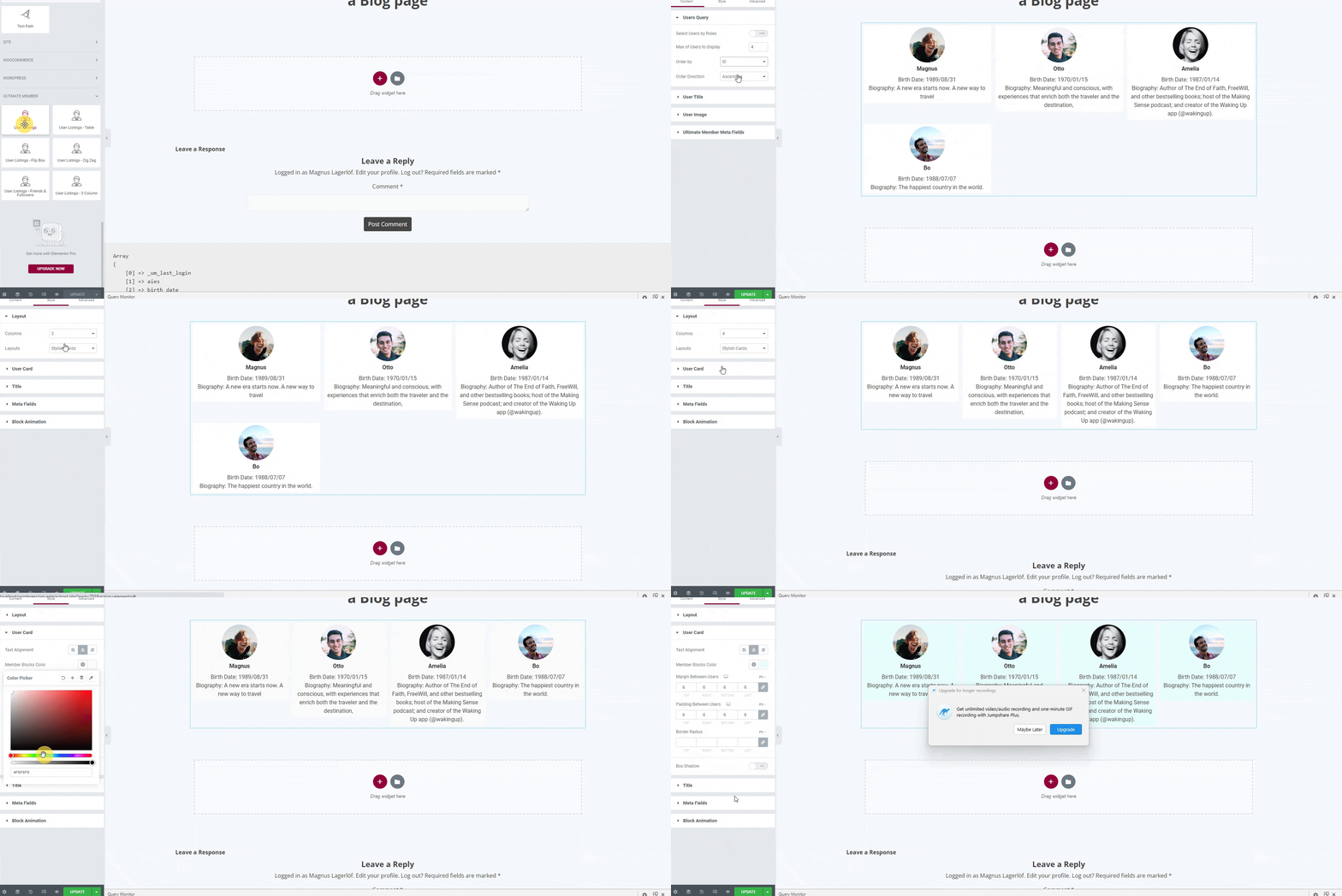
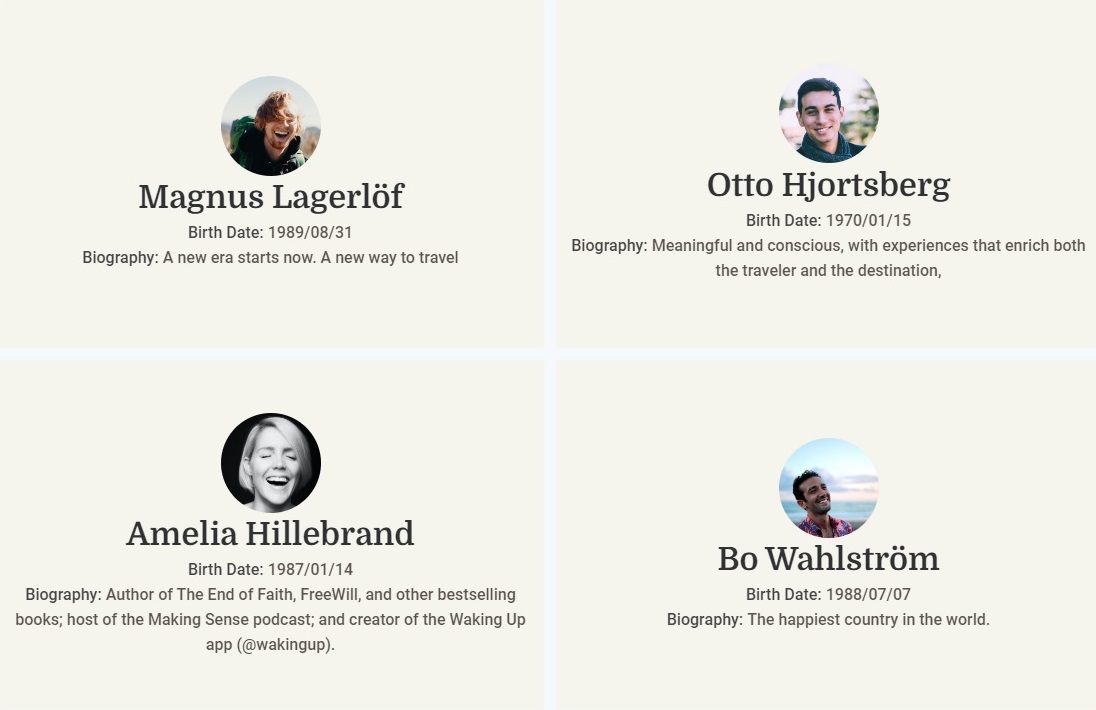
Directory Grid — Display Ultimate Member users in responsive card or list layouts. Visitors search by name and results update instantly with AJAX. Filter by role or custom UM fields, choose numbered pagination, Load More, or Infinite Scroll, and sort by display name, registration date, last login, post count, or a custom field. Live demo | Directory tutorial
WordPress Users — List native WordPress users by role and user meta. Useful for staff directories, teams, authors, and contributor pages. Works without Ultimate Member installed.
Member Flip Cards — Create hover-to-flip profile cards for member spotlights, team sections, or featured users. Live demo
Profile widgets for Ultimate Member pages
Use Elementor to clean up and personalize Ultimate Member profile pages.
Profile Photo — Standalone avatar widget with size, border, radius, and filter controls. Profile page demo
Profile Fields — Output any mix of Ultimate Member fields for the viewed member. Supports text, URL, phone, image, and file fields with visibility rules. Live demo
Profile Name — Show the profile user’s display name, first name, last name, full name, username, or nickname with Elementor typography controls. Live demo
UM Visibility — Show or hide Elementor sections by login state, user role, or field value conditions.
Get started in minutes
Use the widgets on the Ultimate Member pages you already have.
- Activate the plugin with Elementor and Ultimate Member active.
- Open your login page in Elementor — add the Login / Register Form widget, choose Login, and style it.
- Do the same for Register — switch the form type to Register on your register page.
- Add Directory Grid to your members page for a searchable directory.
- Optional — import Creator Community from UM Elementor Design Site Kits if you want a full starter site instead.
Per-page layouts back up the previous Elementor layout before applying changes. Site Kit imports can be undone from the Site Kits screen.
Find widgets in the Elementor panel under Member Pages (forms and profile) and Directories (directory grids and flip cards).
Why this is different from a normal Ultimate Member addon
Most Ultimate Member plugins add one shortcode option or one admin screen. This plugin is the Elementor design layer for the pages members actually use: login, register, password reset, profile, and the member directory.
It also includes one-click page layouts for those mapped Ultimate Member pages, and optional starter sites if you are starting a new community from scratch.
More free Ultimate Member tools from UserElements
These free plugins work great alongside Ultimate Member Widgets for Elementor. Install them from Ultimate Member Our Plugins or Settings Our Plugins:
- Member Export for Ultimate Member — Export and import member data as CSV with filters, column mapping, and saved presets
- SEO for Ultimate Member — Privacy-aware profile sitemap, Yoast & Rank Math integration, Person schema, and Open Graph tags
- Faceted Search for Ultimate Member — Filter sidebar for member directories with live AJAX facet counts
Upgrade to Pro when you need more
The free plugin covers login, register, password reset, account, profile widgets, and directories. Ultimate Member Widgets Pro for Elementor is for replacing the profile page and building advanced directories:
- Profile Page Builder — Replace the default Ultimate Member profile template with a custom Elementor layout
- Member Table — Sortable directory with clickable column headers, global AJAX search, and CSV / Excel export. Tutorial
- Faceted Directory — A full member listing with live facet counts, not a filter bar for Directory Grid
- Directory Map — Show members on a map
- Member Filter — Standalone filter panel with unlimited fields, dropdowns, checkboxes, and radio buttons
- Member Carousel — Touch-friendly slider for featured members, alumni spotlights, or testimonials
- Member Card Grid — Multi-column and zigzag directory layouts
- Member Search — Dedicated AJAX search bar, independent of the directory grid
- UM Directory Styler — Full Elementor visual control over the native Ultimate Member directory shortcode
- Member Loop Grid, Split View, and Alphabet Index — Advanced directory layouts with Elementor templates, side-panel browsing, and A–Z name navigation
- More starter sites — Alumni, startup, church, school, healthcare, and other Pro kits, previewed from the Free library
See all Pro features and live demos
Pricing: Free — unlimited sites. Pro from $45/year. All Access bundle also available.
Do not activate Free and Pro together. Pro replaces Free.
Who is this for?
- Ultimate Member site owners who already have login, register, and members pages and want them to match the rest of the site
- Membership site owners who need a branded login, register, profile, and directory experience in Elementor
- Community builders creating searchable, filterable member directories
- Agencies styling Ultimate Member for client sites
- Directory-style businesses and marketplaces where people browse, search, and filter members or professionals
- New community sites that want an optional starter kit after the widgets, not instead of them
Screenshots




መጫን
- Install this plugin via Plugins Add New, or upload the zip file manually, then activate it.
- Confirm Elementor and Ultimate Member are active.
- Open your Ultimate Member Login page in Elementor and add the Login / Register Form widget. Choose Login, then style it.
- Open your Register page and use the same widget set to Register.
- Open your Members page and add Directory Grid for a searchable directory.
- Optional: apply a one-click page layout from UM Elementor Design Member Pages, or import a starter site from UM Elementor Design Site Kits.
Full walkthrough: plugin documentation
የተለመዱ ጥያቄዎች
-
What does this plugin do?
-
It adds Elementor widgets so you can style Ultimate Member login, register, password reset, profile, and member directory pages without code. If you are starting a new site, you can also import an optional starter site.
-
What is a starter site or Site Kit?
-
A Site Kit is a starter site for Ultimate Member. It can include a home page, login page, register page, password reset page, profile page, member directory, Ultimate Member forms, roles, options, and guest/member headers. The free version includes Creator Community and Local Association, and also previews locked Pro site kits.
-
Do I need Elementor Pro?
-
No. All free widgets and starter site imports work with the free version of Elementor. Elementor Pro is not required.
-
Do I need Ultimate Member?
-
Ultimate Member is required for login, register, password reset, profile, and member directory widgets. Without it, WordPress Users, Show for members, Stat Band, and Member Spotlight still work.
-
Is this plugin good for beginners?
-
Yes. Open your existing Ultimate Member login page in Elementor, add the Login / Register Form widget, and style it. You do not need to import a starter site. Kits are available later if you want a full site in one step.
-
How do I import the free starter site?
-
Activate the plugin, open UM Elementor Design Site Kits, and import Creator Community. If Elementor or Ultimate Member are not installed yet, the importer can install them for you.
-
How do I style the Ultimate Member login page in Elementor?
-
Install the plugin, open your login page in the Elementor editor, and add the Login / Register Form widget. Choose Login in the Content tab. Use the Style tab to change colors, fonts, input borders, button styles, background, padding, and spacing. Every change updates in real time. Publish when done. Login demo | Step-by-step guide: How to Style the Ultimate Member Login Page with Elementor.
-
How do I style the Ultimate Member register form in Elementor?
-
Use the same Login / Register Form widget. Switch the form type to Register in the Content tab, then style field labels, inputs, section headers, submit button, and error messages visually. Both login and register are included free. Register demo
-
Can I style the Ultimate Member password reset page in Elementor?
-
Yes. The Password Reset widget is included free. Style it to match your login and register forms so the full sign-in flow looks consistent. Live demo
-
Can I style the Ultimate Member account page in Elementor?
-
Yes. Add the Account widget to the page set as your Ultimate Member Account page. Style tabs, fields, and buttons. Only logged-in members see the account form.
-
How do I build a member directory in Elementor?
-
Add the Directory Grid widget. Choose card or list layout, enable AJAX live search, add role or custom field filters, and configure pagination (numbered, Load More, or Infinite Scroll). Use WordPress Users if you only need native WordPress users without Ultimate Member. Full walkthrough: Create a WordPress Membership Directory in Elementor.
-
Can I filter my member directory by custom Ultimate Member fields?
-
Yes. The free Directory Grid supports AJAX meta field filters with no page reload. The free version supports up to two filter fields. Pro adds a standalone Member Filter widget with unlimited fields, dropdowns, checkboxes, and radio buttons.
-
Can I show only approved Ultimate Member users in the directory?
-
Yes. Enable Show Only Approved Users in the Directory Grid Content tab to list only members whose UM account status is approved.
-
Can I sort the member directory by last login or a custom field?
-
Yes. Sort by display name, first name, last name, registration date, last login, post count, user ID, or any custom meta field — all from the Elementor widget panel.
-
Can I build a custom Ultimate Member profile page in Elementor?
-
Yes, with Pro. The Profile Page Builder provides dedicated Elementor widgets that replace the default UM profile template: cover photo, header, bio, meta fields, social links, action bar, completion bar, custom tabs, and profile body. See How to Customize the Ultimate Member Profile Page.
-
Can I display members in a sortable table with CSV export?
-
Yes, with Pro. The Member Table widget supports clickable column sorting, global AJAX search, and one-click CSV export of the filtered member list. Step-by-step guide: Display Ultimate Member Users in an Elementor Table.
-
Can I add a member carousel or slider in Elementor?
-
Yes, with Pro. The Member Carousel uses Swiper.js for smooth, touch-friendly sliding — ideal for homepage featured members and testimonials.
-
Can I use the free and Pro versions together?
-
No. Pro replaces Free. Deactivate one before activating the other.
-
Is this compatible with caching plugins like WP Rocket or LiteSpeed Cache?
-
Yes. If AJAX or directory scripts fail after minification, exclude
wp-content/plugins/ultimate-member-widgets-for-elementor/assets/js/from your caching plugin’s JavaScript processing. -
Does this work on WordPress multisite?
-
Yes. Each site in the network operates independently with its own user query scope.
-
Where can I see live demos?
-
Visit demo.userelements.com — interactive demos for every widget. No login required.
Reviews


Contributors & Developers
“Ultimate Member Widgets for Elementor – Login, Directory & Profile” is open source software. The following people have contributed to this plugin.
Contributors
Translate “Ultimate Member Widgets for Elementor – Login, Directory & Profile” into your language.
Interested in development?
Browse the code, check out the SVN repository, or subscribe to the development log by RSS.
Changelog
3.0.0
- Changed: WordPress.org title is now “Ultimate Member Widgets for Elementor – Login, Directory & Profile”. Listing leads with login, directory, and profile widgets. Site Kits stay available as an optional path, not the reason to install.
- Changed: Without Ultimate Member, Show for members, Stat Band, and Member Spotlight still register. Login, directory, and profile widgets stay locked behind UM.
- Changed: Curiosity CTAs (Learn / Explore / See what Pro includes) open the feature page. Checkout opens only from Upgrade buttons, next to See Demo where a demo exists.
- Added: Account styler — style Ultimate Member account tabs in Elementor. Existing Pro widget ID
umep-account-stylerstill renders. - Changed: Pro upgrade copy describes Faceted Directory as a full member listing, not a filter bar.
- Changed: Style Studio is on the import screen and applies on import, so kits keep their radius and type scale. The collapsed “After you import a kit” panel is gone.
- Fixed: Member Flip Cards uses its own Elementor panel icon. The User Profile Pro teaser no longer shares eicon-person with Directory Grid.
- Improved: Creator Community browse card uses a dedicated thumbnail and page screenshots. Dead demo URLs are removed from bundled and Pro preview kits.
- Fixed: Setup wizard is listed again under Ultimate Member Get started.
- Fixed: Login / Register Form defaults to Registration when you add it on the UM Register page. Saved form type is unchanged.
- This release does not rename widget IDs. Existing pages keep working.
2.9.4
- Added: Role-aware UM Site Headers — build Elementor headers for guests, logged-in members, or specific Ultimate Member roles (Ultimate Member Site Headers). Optional theme header hide, priority matching, and
[um_site_header]shortcode. - Added: Member Header Nav widget — Login/Register for guests; avatar, profile, account, directory, and logout for members, plus optional role-specific extra links.
- Added: Visual layout image-selector in the Elementor editor for Member Directory Grid and WordPress User Grid — pick Card, List, or Custom Template from thumbnail previews instead of icon/dropdown controls. Locked Pro Table and Carousel options keep the upgrade tooltip and notice.
- Fixed: Directory Grid pagination totals no longer come from a limited page query, so 100 users per page paginates the full member pool instead of greying out the pager.
- Added: Site Kits — import a complete membership site (pages, UM forms, roles, directory, guest/member headers). Creator Community is bundled free. Pro kits stay locked without a Pro licence.
- Added: One-click installer for Elementor and Ultimate Member from the Site Kits screen, so a new WordPress site can go from this plugin to a working membership site without hunting for dependencies.
- Added: Role-aware UM Site Footers (Ultimate Member Site Footers), used by Site Kits.
- Added: Hidden widget aliases so Pro widget names (
umep-*andum-user-profile-avatar) still render in Free. Existing pages that useum-login-register-styler,umwfe-member-header-nav,um-user-avatar, and the other Free widget IDs are unchanged. - Improved: Setup wizard, plugin action links, and the first-run notice now lead with Site Kits.
- Improved: This plugin can activate without Elementor already installed, so the Site Kits importer can install Elementor for you.
- This release repositions the plugin as the design layer for Ultimate Member. Widget IDs on existing pages are not renamed.
2.9.3
- Fixed: User Directory Grid role filter was ignored — selected roles (including custom Ultimate Member roles) now correctly limit the directory on initial render and AJAX search/pagination.
2.9.2
- Added: Our Plugins admin page — discover and one-click install related free UserElements Ultimate Member plugins (Member Export, SEO for Ultimate Member, Faceted Search). Available under Ultimate Member Our Plugins and Settings Our Plugins.
2.9.1
- Fixed: Fatal error with Elementor Pro Theme Builder —
UM_Condition_Base::get_priority()is now static to match Elementor Pro’sCondition_Basesignature.
2.9
- Added: Custom Template layout on Member Directory Grid and WordPress User Grid — pick an Elementor library template (Loop Item / Container / Section) and render it once per member. UM dynamic tags resolve per card. Card and List layouts are unchanged.
- Improved: Elementor 4.2 compatibility — declared “Elementor tested up to: 4.2.0” and enforce a minimum Elementor 3.5.0 version with an admin notice when older.
- Improved: Directory list widgets use Elementor’s
elementsHandler.attachHandlerlifecycle (with legacyelement_readyfallback) and expose pagination/layout settings viafrontend_availablefordata-settings. - Improved: AJAX directory handlers read saved widget settings through Elementor’s Documents API instead of walking raw
_elementor_datameta. - Improved: Soft Ultimate Member dependency — WordPress User Grid works without UM; UM widgets and AJAX register only when Ultimate Member is active, with a clear admin notice when it is missing.
- Fixed: Profile Photo dynamic tag now uses Elementor
Data_Tagfor Image controls; added a separate Profile Photo URL tag for URL controls. - Fixed: Member Avatar and Member Name widgets used the deprecated
_register_controls()method — migrated toregister_controls(). - Fixed: Member and profile widgets mark themselves as dynamic content and respect Elementor’s optimized markup experiment (
has_widget_inner_wrapper). - Fixed: WordPress User Grid now initializes correctly in the Elementor editor/preview via the frontend handler API.
- Added: Lightweight editor
content_template()placeholders for directory widgets.
2.8
- Added: Field Layout for the Login & Register Form widget — arrange UM form fields visually: set widths (full, 2/3, half, 1/3) for multi-column rows, reorder fields, hide labels, and control column gap. Pure CSS on UM’s own field wrappers; fields and validation stay managed in Ultimate Member, so nothing can desync.
- Added: Setup wizard — a guided 3-step first-run flow (requirements check, per-page starter designs, finish) that launches on activation and stays reachable from the Elementor Setup screen.
- Added: Starter templates — one-click Elementor layouts for the Login, Register, Password Reset, and Members Directory pages, applied to the mapped UM core page and opened straight in the editor.
- Added: Automatic layout backups — the previous Elementor layout of a page is saved before a starter template is applied and can be restored from the Elementor Setup screen.
- Improved: Widgets renamed into one consistent “Member” family (Member Login & Register Form, Member Password Reset, Member Flip Cards, Member Avatar, Member Name, Member Fields, WordPress User Grid, Logout Link) — panel search now finds every widget by natural keywords.
- Improved: Every widget links its Elementor “Need Help?” button to the matching tutorial or documentation page.
- Improved: The Members Directory page is no longer marked Pro in the wizard and setup dashboard — build it with the free Member Directory Grid; styling UM’s native directory shortcode remains a Pro widget.
- Improved: Admin menu entries renamed to “Member Pages” (Settings + Ultimate Member) for a single product surface across free and Pro.
- Added: Free vs Pro comparison table on the setup screen with per-feature demo links.
- Added: Editor guidance when a directory query matches no members on a new site.
- Added: “Hide locked Pro widgets” option under Member Pages Advanced.
- Added: One-time success toast after applying a starter template, with next-step guidance.
- Removed: Unused bundled image; tightened upgrade-notice copy.
- Fixed: Member directory widgets were capped at 100 users regardless of widget settings. Queries now respect Number of Members (up to 1000) and Users Per Page, including AJAX directory requests.
2.7
- Fixed: Removed duplicate legacy admin upgrade notice that could not be dismissed on Plugins/Dashboard screens.
- Fixed: In-editor Pro placeholder upgrade links now use centralized URLs with UTM attribution instead of a hardcoded price.
- Security: AJAX directory endpoints no longer trust client-supplied widget_settings query keys; meta filters are constrained to widget-exposed fields.
- Improved: New query engine enabled by default; cache invalidation only runs for directory-relevant meta changes.
2.6
- Added: UM Login & Register Form widget — style Ultimate Member login and register forms visually in Elementor.
- Added: Password Reset widget — complete your styled authentication flow in Elementor.
- Added: Pro widget placeholders in the Elementor editor — free users see upgrade cards for locked Pro widgets on the canvas.
2.5
- Security: AJAX filter endpoints now verify nonce before any file I/O or class loading.
- Security: meta_query items from widget_settings are sanitized before reaching WP_User_Query.
- Security: per_page in the UM AJAX handler clamped to a maximum of 100.
- Security: debug output gated behind WP_DEBUG on all error paths.
- Security: email address removed from default public meta fields in WP User List handler.
- Fixed: sort order control works for all options — ID, first/last name, last login, post count, email.
- Fixed: box shadow control uses Group_Control_Box_Shadow.
- Fixed: admin notice dismiss nonce mismatch caused silent dismiss failures.
- Fixed: PHP fatal when Elementor is inactive — undefined admin notice callbacks.
- Fixed: deprecated Elementor Scheme_Color and Scheme_Typography imports in flip card widget.
- Fixed: widget category sometimes did not appear due to hook registration timing.
- Fixed: meta key selector uncached table scan on every editor load — results cached one hour.
- Fixed: Pro layout values in database caused user cards to disappear — now fall back to card layout.
- Fixed: widget order_by and order settings not passed to the query engine.
- Added: Table and Carousel layout options visible in free widget with upgrade tooltip.
- Added: meta cache primed after user queries to avoid N+1 meta fetches.
- Added: query result transients invalidated on user profile, meta, or role changes.
- Improved: user-processing loop unified into shared static methods across AJAX handlers.
- Improved: pro upgrade notice scoped to admin-only roles and screens.