

ማብራሪያ
Easy MCP AI is the most complete WordPress MCP Server — a remote MCP server built so AI assistants can run your entire site workflow, from content and publishing to SEO research, traffic monitoring, and daily admin, through the Model Context Protocol. It works as an MCP adapter for WordPress, connecting any MCP-compatible AI client directly to your site. Ask your AI about Google Analytics, Search Console, and SEO data without leaving your chat. You bring the direction. Your AI handles the execution.
No Node.js. No external proxy. No complicated setup. Just install, generate a token, and start building.
At a glance:
- 192 tools across posts, pages, media, users, comments, menus, Google Analytics, Search Console, Semrush, DataforSEO, and more
- 1-click OAuth 2.1 with per-scope consent (Claude Desktop, Cursor, etc.)
- Plugin integrations — WooCommerce, ACF, The Events Calendar, BuddyPress, Yoast, Rank Math, AIOSEO
- Google Analytics 4 & Search Console — ask your AI about traffic, top pages, conversions, search queries, clicks, impressions, and indexing status
- Semrush — ask your AI for domain overviews, organic keywords, competitor research, keyword difficulty, related keywords, question phrases, and backlink analytics
- DataforSEO — ask your AI for live SERP results, keyword search volumes, backlink data, on-page audits, and ranked/site keywords
- Auto-discovers WordPress 6.9+ Abilities
- Fully audit-logged — every AI action on your site, recorded
Works With Every Major AI
Connect any of the following AI assistants or AI chatbots directly to your WordPress site:
- Manus — the autonomous AI agent that can run multi-step workflows start to finish
- Claude (Claude.ai, Claude Desktop, Claude Code) — Anthropic’s powerful assistant
- ChatGPT (OpenAI Developer Mode) — the world’s most popular AI, connected to your site
- Gemini CLI / Google Antigravity — Google’s AI tools with MCP support
- Cursor, Windsurf, Cline, Roo Code — AI-powered code editors that can also manage your content
- n8n — automation for content pipelines and publishing workflows
- Any MCP-compatible client — the protocol is open and supported by a growing ecosystem
What Can Your AI Do On Your Site?
Once connected, your AI assistant can handle everything you’d normally do in the WordPress admin:
Content — draft, write, edit, and publish posts and pages; search and update existing content
Media — browse your media library, upload new images, update alt text and captions
Organization — manage categories, tags, and navigation menus
Users — list users, create accounts, update profiles and roles
Plugins & Themes — see what’s installed, activate or deactivate plugins
Site Settings — read and update core WordPress settings
Google Analytics 4 — ask about traffic, top pages, conversions, custom dimensions/metrics, and realtime active users
Google Search Console — ask about top search queries, clicks, impressions, sitemaps, and URL indexing status
Semrush — pull domain overviews, organic keyword and competitor research, keyword difficulty and related keywords, question phrases, and backlink overview / referring domains / anchors for any target
DataforSEO — check keyword search volumes and trends, pull live SERP results, analyse backlinks, run on-page audits, and look up ranked keywords for any domain
Any Plugin — automatically connects to plugins that support WordPress 6.9+ Abilities, no custom code needed
Tools
74 core tools covering every major WordPress content type:
Posts — list, get, create, update, delete, search
Pages — list, get, create, update, delete
Media — list, get, upload, update, delete
Categories — list, get, create, update, delete
Tags — list, get, create, update, delete
Comments — list, get, create, update, delete
Users — list, get, create, update, delete
Menus — list menus, get, create, update, delete; list, create, update, delete menu items
Custom Post Types — list, get, create, update, delete CPT items
Post Meta — get and update post meta
Revisions — list, get, delete post revisions
Blocks — list, get, create, update, delete blocks
Templates — list, get, update block templates
Styles — get and update global styles
Site — get and update settings, list post types, taxonomies, and post statuses
Plugins — list installed plugins
Themes — list themes, get active theme
Search — search across all content
11 Google Analytics 4 Tools
Account & Property — list account summaries, get property details, check compatibility, get metadata
Reports — run standard reports, pivot reports, and realtime reports
Configuration — list data streams, conversion events, custom dimensions, and custom metrics
6 Google Search Console Tools
Sites — list verified properties
Search Analytics — query top search terms, pages, countries, devices with clicks, impressions, CTR, and position
Sitemaps — list and inspect submitted sitemaps
URL Inspection — check indexing status and coverage for any URL on your site
13 Semrush Tools
Domain — domain overview and organic competitor research
Keywords — domain organic keywords, URL organic keywords, keyword overview, related keywords, keyword difficulty, and phrase questions
Backlinks — backlinks overview, backlinks list, referring domains, and anchors
Account — check your Semrush API units balance at any time
8 DataforSEO Tools
SERP — fetch live search engine results pages for any keyword and location
Keywords — look up monthly search volume and trend data for one or more keywords
Labs — get ranked keywords for any domain, or find keywords a specific page ranks for
Backlinks — get a backlink summary and list of referring domains for any target URL
On-Page — run an on-page SEO audit on any URL and get a list of actionable issues
Account — check your DataforSEO API account balance at any time
37 WooCommerce MCP Tools
Products — list, get, create, update, delete products; list and create product variations; list product categories
Orders — list, get, create, update orders; list order notes, create order note; list order refunds (read-only)
Customers — list, get, create, update, delete customers
Coupons — list, get, create, update, delete coupons
Webhooks — list, get, create, update, delete webhooks
Shipping — list shipping zones, list shipping methods
Tax — list tax rates
Payment — list payment gateways
Reports — sales, orders, products, top sellers, customers
6 Plugin Integrations
WooCommerce — 37 tools for products, orders, customers, coupons, shipping, reports, and more
Advanced Custom Fields (ACF) — 6 tools to get and update custom fields on posts, users, and terms; list field groups
The Events Calendar — 10 tools to create and manage events, venues, and organizers
BuddyPress — 10 tools for members, activity stream, groups, group members, and private messages
Yoast SEO — get and update post SEO metadata and rendered SEO head output
Rank Math — get and update post SEO metadata and rendered SEO head output
All in One SEO (AIOSEO) — get and update post SEO metadata
Connect Any Plugin with Abilities
WordPress 6.9+ introduces Abilities — a standard way for plugins to declare what they can do. Easy MCP AI automatically discovers Abilities registered by any plugin and exposes them as MCP tools. No custom code needed — if a plugin supports Abilities, your AI can use it out of the box.
One-Click Connect with OAuth 2.1
Skip manual token copy-paste. Easy MCP AI ships with a full OAuth 2.1 authorization server — PKCE, refresh-token rotation, and Dynamic Client Registration (RFC 7591) built in. Compatible MCP clients like Claude Desktop can connect with a single click: they register themselves, you approve the scopes on a consent screen, and you’re done. Bearer tokens still work for power users and automation.
Built for Security
Giving an AI access to your site is serious — so security is built into every layer:
- Bearer token authentication with SHA-256 hashing — the raw token is never stored
- Per-token permissions — create a read-only token for one AI, a full-access token for another
- WordPress capability checks on every single tool call
- Rate limiting per token (default 60 requests/min, configurable)
- Full audit log — every tool call is logged with the token used, arguments, result, and client IP
- IP whitelisting — optionally restrict which IPs can use the MCP endpoint
Simple Admin Interface
- Dashboard — your MCP endpoint URL and one-click connection configs for every major AI client
- API Tokens — create and manage tokens with a checkbox-based tool permission tree
- Audit Log — a paginated, searchable log of every AI action taken on your site
- Settings — tune rate limits, log retention, IP whitelist, and more
External services
This plugin connects to the following third-party services only when a site administrator explicitly configures their own external account credentials in Easy MCP AI External Data. Nothing is contacted on a default install.
Semrush API — api.semrush.com, www.semrush.com
- When: only if an admin saves a Semrush API key.
- What is sent: the configured Semrush API key plus the parameters supplied per call (target domain, target URL, keyword/phrase, database/region code, display limits).
- Terms: https://www.semrush.com/company/legal/terms-of-service/
- Privacy: https://www.semrush.com/company/legal/privacy-policy/
DataForSEO — api.dataforseo.com
- When: only if an admin saves a DataForSEO account login + API password.
- What is sent: the configured DataForSEO login + API password (HTTP Basic auth), plus the parameters supplied per call (keyword, target domain, target URL, location code, language code).
- Terms: https://dataforseo.com/terms-of-use
- Privacy: https://dataforseo.com/privacy-policy
Google Analytics 4 Data API — analyticsdata.googleapis.com (token exchange via oauth2.googleapis.com)
- When: only if an admin uploads a Google service-account JSON.
- What is sent: a signed JWT minted from the service-account key, plus the GA4 property id and report definition (dimensions, metrics, date range, filters) chosen per call.
- Terms: https://policies.google.com/terms
- Privacy: https://policies.google.com/privacy
Google Search Console API — searchconsole.googleapis.com / www.googleapis.com/webmasters/v3 (token exchange via oauth2.googleapis.com)
- When: only if an admin uploads a Google service-account JSON.
- What is sent: a signed JWT minted from the service-account key, plus the Search Console site URL and per-call parameters (date range, dimensions, URL to inspect, sitemap URL).
- Terms: https://policies.google.com/terms
- Privacy: https://policies.google.com/privacy
Author
Developed by EasyMCPAI.
Screenshots
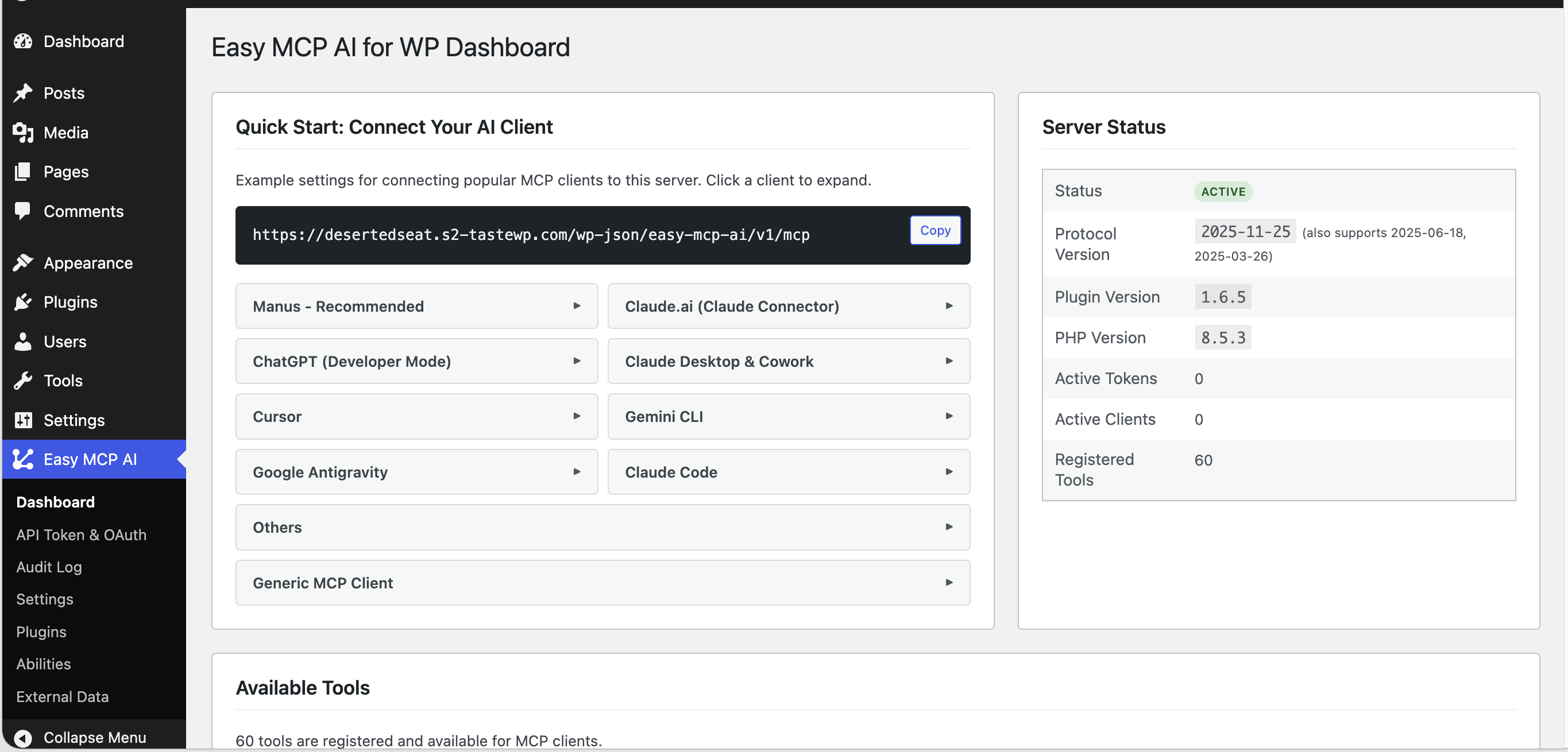
Dashboard — your MCP endpoint URL and quick-start configs for every major AI client 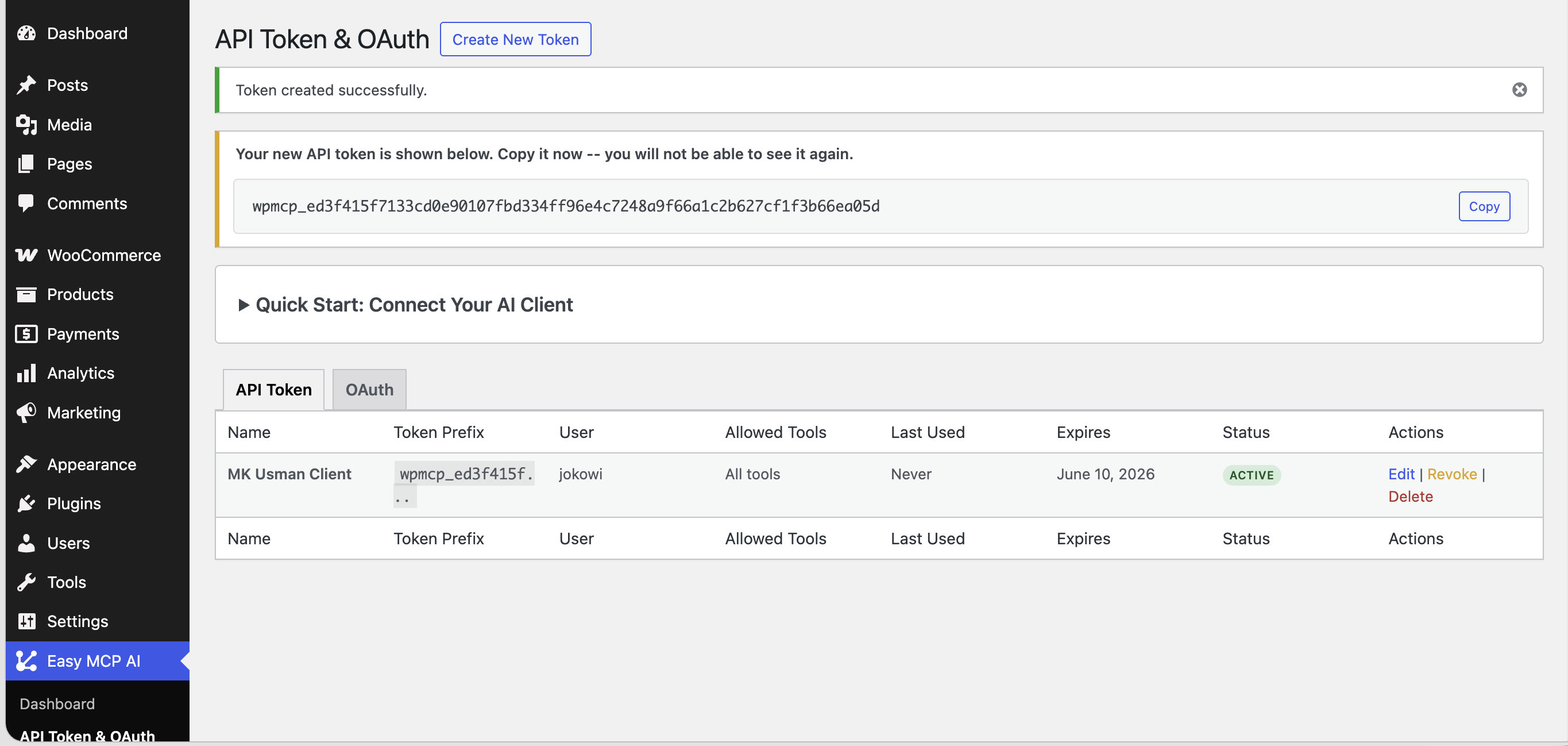
API Tokens & OAuth — token list with one-time token display and quick-connect guide 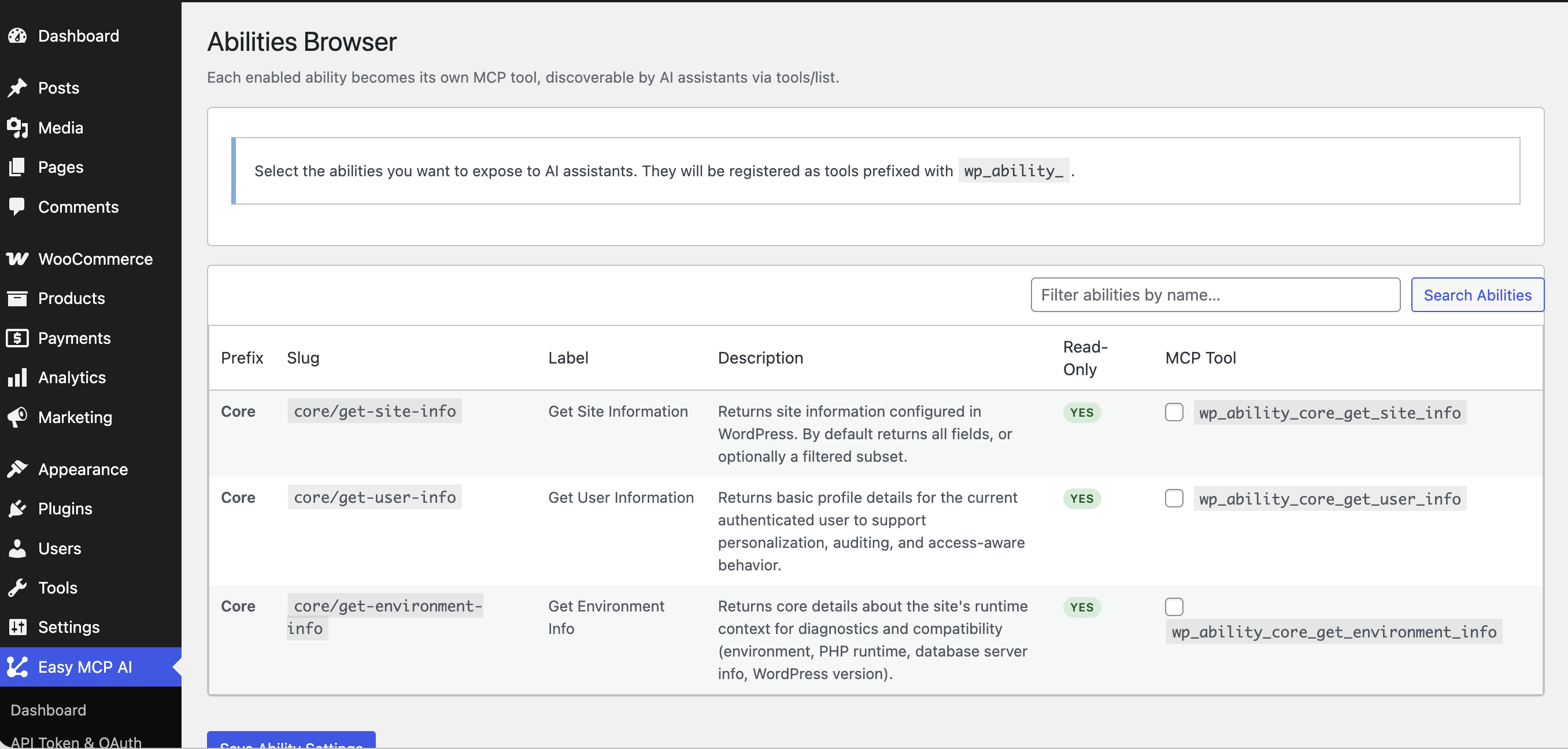
Abilities Browser — expose WordPress 6.9+ abilities as MCP tools with a single click 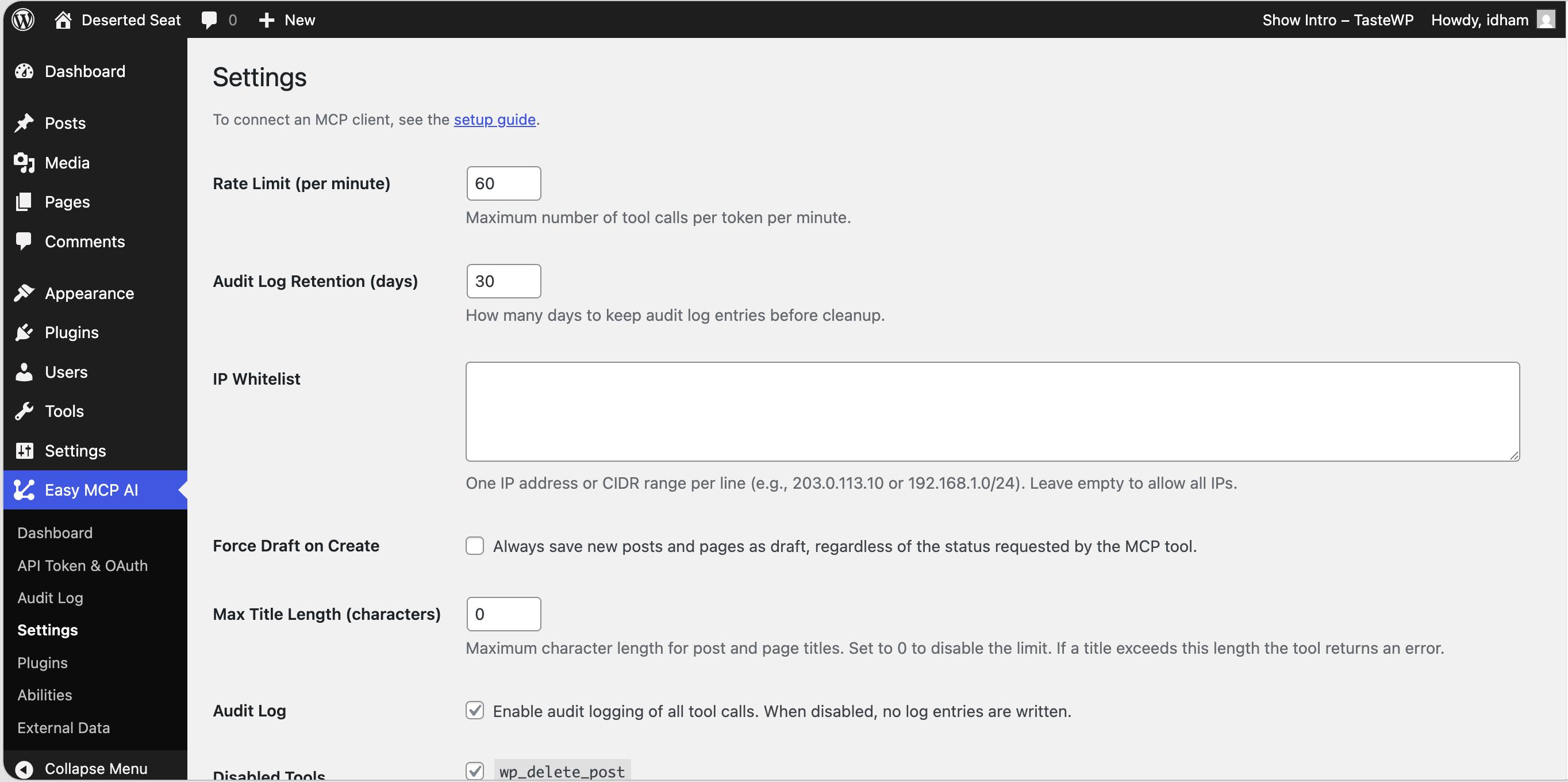
Settings — rate limits, IP whitelist, force draft, audit retention, and disabled tools 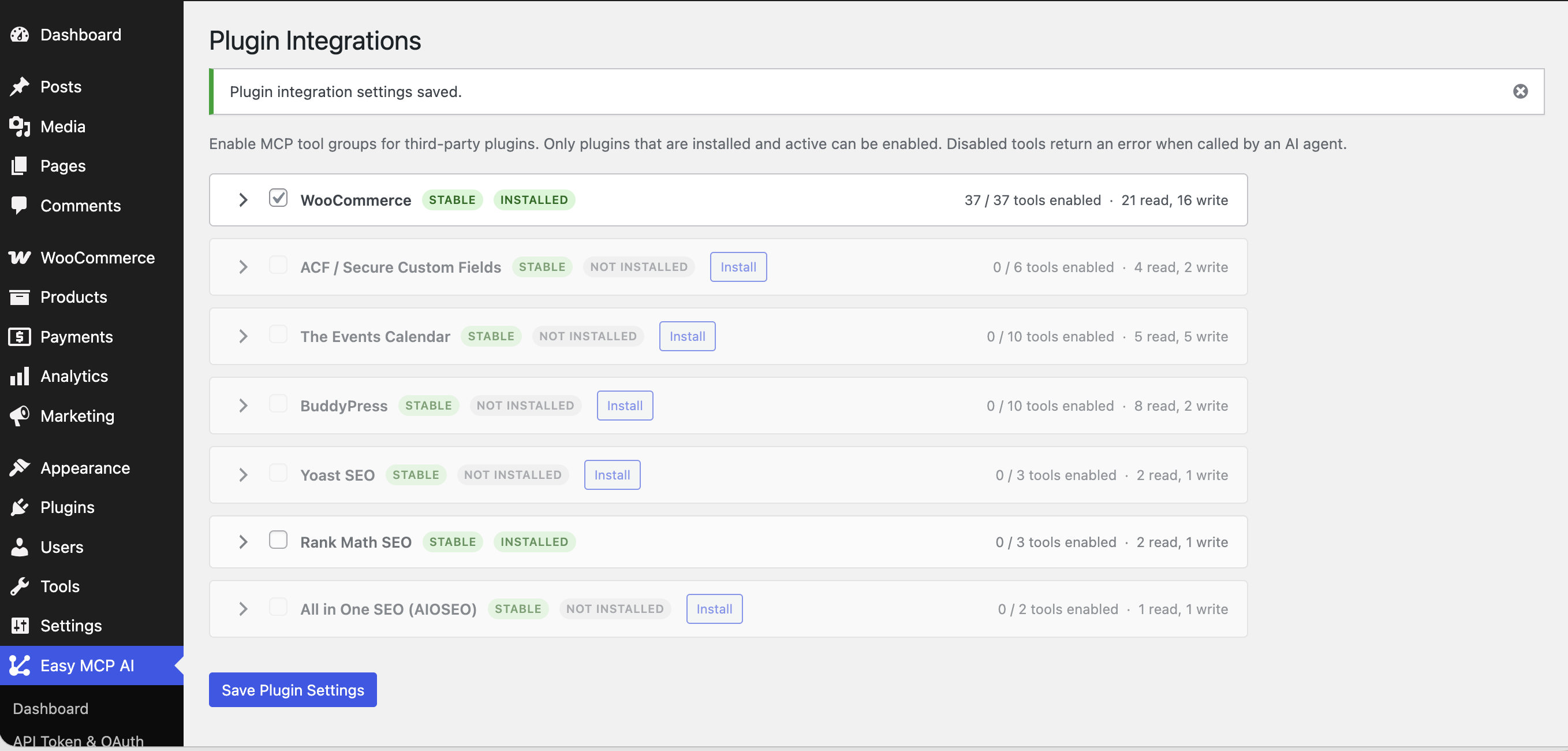
Plugin Integrations — enable MCP tool groups for WooCommerce, ACF, Yoast, Rank Math, and more 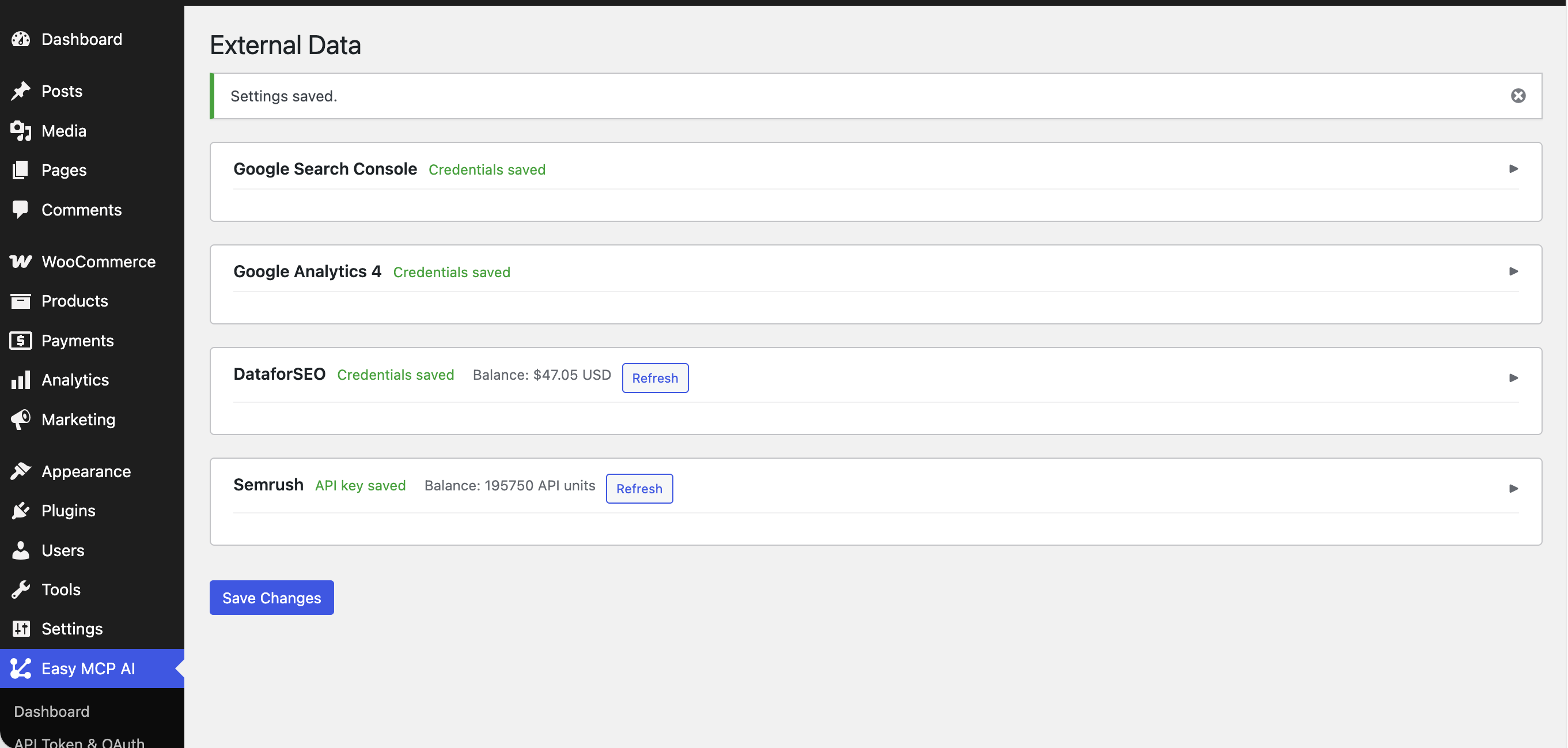
External Data — connect Google Search Console, Google Analytics 4, Semrush, and DataForSEO with encrypted credentials
መጫን
Automatic Installation
- In your WordPress admin, go to Plugins Add New Plugin.
- Search for “Easy MCP AI”.
- Click Install Now and then Activate.
Manual Installation
- Download the plugin ZIP from the WordPress plugin directory.
- In your WordPress admin, go to Plugins Add New Plugin Upload Plugin.
- Upload the ZIP, click Install Now, then Activate.
After Activation
Which should I use? Use Path A if your client supports OAuth.
Path A — One-Click Connect (OAuth)
- Go to Easy MCP AI Dashboard and copy your MCP server URL.
- In your AI client (e.g. Claude Desktop Settings Connectors Add custom connector), paste the server URL. No token needed.
- Your browser opens a WordPress login + consent screen. Sign in as the user the AI should act as.
- Tick the permission categories (Read / Write per content type, GA4, Search Console, etc.) you want to grant, then Approve.
- The client is connected. Start talking to your site.
- Manage or revoke connected clients anytime under Easy MCP AI API Token & OAuth OAuth tab.
Path B — Manual Token (Bearer)
- Go to Easy MCP AI API Tokens in your WordPress admin sidebar.
- Click Create New Token.
- Give the token a name, choose the WordPress user the AI will act as, and select which tools to allow.
- Click Create Token and copy the token — it is only shown once.
- Open your AI assistant, paste in the endpoint URL and token from the Dashboard page.
- Start talking to your site.
የተለመዱ ጥያቄዎች
-
What is Easy MCP AI?
-
Easy MCP AI is a WordPress plugin that turns your site into a remote MCP (Model Context Protocol) server. Once activated, any MCP-compatible AI assistant — Claude, ChatGPT, Cursor, Gemini, n8n, and more — can read and write content, manage media, users, and settings, and pull SEO and analytics data through 192 ready-to-use tools. No Node.js, no proxy, no extra hosting.
-
Is this a WordPress MCP server?
-
Yes. Easy MCP AI is a full WordPress MCP server implementing the Model Context Protocol spec (v2025-11-25, with backwards compatibility for v2025-06-18 and v2025-03-26) directly inside WordPress. Your site exposes a single MCP endpoint at
/wp-json/easy-mcp-ai/v1/mcpthat any MCP client can connect to over HTTPS. -
What is the Model Context Protocol (MCP)?
-
MCP is an open standard created by Anthropic that lets AI assistants securely connect to external tools and data sources. It’s quickly becoming the universal protocol for AI-to-app communication, supported by Anthropic, OpenAI, Google, and dozens of other platforms. Learn more at modelcontextprotocol.io.
-
How is Easy MCP AI different from other WordPress AI plugins?
-
Most WordPress AI plugins embed a single AI provider (OpenAI, Claude, etc.) inside the wp-admin and bill you for usage. Easy MCP AI does the opposite — it makes your WordPress site act as a backend that any AI assistant can connect to over MCP. You bring your own AI client, you bring your own model, and the plugin focuses on giving that AI safe, scoped access to your site: 192 tools, OAuth 2.1 one-click connect, per-token permissions, and a full audit log.
-
Is Easy MCP AI free?
-
Yes. Easy MCP AI is free and open source on the WordPress.org plugin directory. There are no paid tiers, no usage limits, and no telemetry. Optional external integrations (Semrush, DataForSEO, Google Analytics, Search Console) use your own third-party accounts — Easy MCP AI never bills you for API usage.
-
How do I connect Claude, ChatGPT, Cursor, Gemini, or n8n to my WordPress site?
-
After activation, go to Easy MCP AI Dashboard and copy your MCP server URL. Then:
- Claude Desktop / Claude.ai / Claude Code — Settings Connectors Add custom connector, paste the URL, approve the OAuth consent screen. One click, no token.
- ChatGPT (Developer Mode) — add as an MCP server using the same URL.
- Cursor / Windsurf / Cline / Roo Code — add MCP server in the client’s settings using the URL.
- Gemini CLI / Google Antigravity — register the MCP endpoint in the client config.
- n8n — use the MCP node and point it at the URL plus a Bearer token created under Easy MCP AI API Tokens.
See the integrations page for step-by-step guides per client.
-
Does it work with WooCommerce, Yoast, Rank Math, ACF, BuddyPress, and The Events Calendar?
-
Yes. Easy MCP AI ships with first-party tool sets for WooCommerce (37 tools — products, orders, customers, coupons, reports, shipping, webhooks), Advanced Custom Fields (ACF) (6 tools), The Events Calendar (10 tools), BuddyPress (10 tools), Yoast SEO, Rank Math, and All in One SEO (AIOSEO). Each integration only loads if the underlying plugin is active, and each tool group can be toggled individually under Easy MCP AI Plugin Integrations.
-
How do I connect Semrush, DataForSEO, Google Analytics, and Search Console?
-
Go to Easy MCP AI External Data. Each service has its own section:
- Semrush — paste your API key, click Test, then toggle the 13 Semrush tools you want enabled.
- DataForSEO — enter your account login + API password, click Test, then enable the 8 DFS tools.
- Google Analytics 4 — upload a Google Cloud service-account JSON, set the default GA4 property id.
- Google Search Console — upload a service-account JSON, set the default site URL.
All credentials are stored AES-256-GCM encrypted with per-provider HKDF-derived keys. Nothing is sent to any third party until an AI actually calls a tool that needs it.
-
Does this plugin send my content to OpenAI, Anthropic, or Google?
-
No. Easy MCP AI does not call any AI provider. The flow is the opposite: your AI assistant (Claude, ChatGPT, etc.) calls your WordPress site, and the plugin executes whatever tool the AI requested. Your content only leaves your server in the response that goes back to the AI client you connected — never to a third party you didn’t choose. Outbound connections to Semrush / DataForSEO / Google APIs only happen if you explicitly configure those credentials, and they only receive the per-call parameters (keywords, target URLs, date ranges) — not your post content.
-
How does authentication work?
-
Two options, both production-grade:
- OAuth 2.1 one-click connect (recommended) — open your AI client, paste your MCP URL, sign in to WordPress, approve the consent screen. Done.
- Manual Bearer token — create a token under Easy MCP AI API Tokens, paste it into your AI client.
Under the hood, every token (OAuth or Bearer) is SHA-256 hashed before being saved — the raw value is never stored and cannot be recovered after creation.
-
How does OAuth 2.1 one-click connect work?
-
Skip the copy-paste. In a supported client like Claude Desktop or Cursor, paste your MCP URL, sign in to WordPress, tick the permission categories (Read / Write per content type, GA4, Search Console, Semrush, etc.) on the consent screen, and click Approve. The client receives a short-lived access token plus a rotating refresh token, and you can revoke it anytime from the admin.
Under the hood the plugin implements the full OAuth 2.1 spec: PKCE (S256), RFC 7591 Dynamic Client Registration, refresh-token reuse detection (RFC 9700), RFC 8707 audience binding, RFC 8414 and RFC 9728 discovery endpoints, and RFC 7009 revocation. No AI client ever sees your WordPress password.
-
Do I need to enable OAuth?
-
No configuration required — OAuth endpoints are live as soon as the plugin is activated. You can manage registered clients and revoke per-user grants under Easy MCP AI API Token & OAuth OAuth tab. Bearer tokens continue to work alongside OAuth for power users and automation.
-
Can I control what the AI is allowed to do?
-
Yes, fully. Each token has its own permission set — you choose exactly which of the 192 tools it can call. Create a read-only token for a summarization AI, a content-only token for your writing assistant, and a full-access token for your trusted automation workflows.
-
Can I limit which posts or pages the AI can edit?
-
Permissions are enforced at the WordPress capability level, not per-post. Easy MCP AI runs every tool call as the WordPress user the token is bound to, so the AI inherits exactly that user’s
edit_posts/edit_others_posts/publish_postscaps. If you want an AI restricted to, say, drafts only, create a dedicated low-privilege WordPress user (Contributor or Author) and bind the token to that user. Additionally, the Force Draft setting under Settings forces every create operation to draft status regardless of the AI’s request. -
How do I revoke access for an AI client?
-
For OAuth-connected clients, go to Easy MCP AI API Token & OAuth OAuth and click Revoke next to the grant — the client immediately loses access and any active refresh tokens are invalidated. For Bearer tokens, go to Easy MCP AI API Tokens and delete the token. Either action is instant and irreversible.
-
Where can I see a history of every AI action?
-
Go to Easy MCP AI Audit Log. Every tool call is recorded with the token used, the tool name, the arguments, the result, the client IP, and a timestamp. The log is paginated and searchable, and retention is configurable under Settings (default 30 days, after which old rows are auto-purged).
-
Will the AI publish posts automatically?
-
Only if you let it. By default, the AI can create posts in whatever status it asks for (draft, publish, etc.) — but you can flip the Force Draft on Create setting under Easy MCP AI Settings and every newly created post or page will be forced to
draftregardless of what the AI requested. Combine that with a Contributor-level WordPress user for the AI to require human review before anything goes live. -
Is it safe to run on a live site?
-
Yes — Easy MCP AI is built for production. Every request is authenticated (OAuth 2.1 or Bearer), capability-checked against WordPress core permissions, rate-limited (default 60 req/min per token, configurable), and recorded in the audit log. You can additionally restrict the endpoint to specific IP addresses, force all created content to draft, disable specific tools globally, and bind tokens to low-privilege WordPress users. The plugin only requires HTTPS for OAuth flows — bearer-token access is allowed over HTTP for local development but should never be exposed that way on a live site.
-
Does it work with WordPress multisite?
-
Yes. Easy MCP AI runs per-site on a multisite network — each subsite has its own MCP endpoint, its own tokens, and its own audit log. Network-scoped operations (network options, sitewide plugin/theme activation) are additionally gated on Super Admin +
manage_network_options/manage_network_pluginscapabilities, so a per-site admin token cannot reach network-level state. -
Can I use this on localhost or a staging site?
-
Yes. On loopback addresses (
127.0.0.1,::1) the OAuth HTTPS requirement is automatically relaxed so you can test againsthttp://localhost. For non-loopback dev setups behind a reverse proxy that terminates TLS elsewhere, adddefine('EASY_MCP_AI_OAUTH_ALLOW_HTTP', true);towp-config.php. Never set that flag on a production site. Bearer-token access works over HTTP without any flag, but again, only for dev. -
Does it work with custom post types and Gutenberg blocks?
-
Yes to both. The post and page tools accept a
post_typeparameter so your AI can work with any registered CPT on your site (wp_list_cpt_items,wp_create_cpt_item, etc.). For Gutenberg, there are dedicated tools for reusable blocks (wp_list_blocks,wp_create_block,wp_update_block) and block templates (wp_list_templates,wp_get_template,wp_update_template), plus full global styles support (wp_get_global_styles,wp_update_global_styles). -
Can I connect multiple AI assistants at once?
-
Yes. Create one token (or one OAuth grant) per assistant. Each tracks its own usage, has its own scoped permissions, and is logged independently — so you can see exactly which AI did what.
-
What WordPress and PHP versions are required?
-
WordPress 6.0+ and PHP 7.4+. PHP 8.0 or higher is recommended. WordPress 6.9+ unlocks the Abilities auto-discovery feature, which exposes any Abilities-compatible plugin as MCP tools with no extra code.
-
Does this require Node.js or a special server?
-
No long-running processes, no Node.js, no Docker. The plugin runs entirely inside WordPress as a normal PHP plugin. The plugin contacts external services (Semrush, DataForSEO, Google Analytics, Google Search Console) only if you explicitly add those third-party account credentials under Easy MCP AI External Data — see the External services section above. Out of the box, nothing leaves your server.
-
- 404 Not Found — go to Settings Permalinks in WordPress admin and click Save Changes to flush rewrite rules. Pretty permalinks must be enabled.
- 401 Unauthorized — double-check the Bearer token in your AI client matches one shown under Easy MCP AI API Tokens (tokens are only shown once at creation — if you lost it, delete and recreate). For OAuth clients, try disconnecting and re-approving the connector. Also confirm your
Authorization: Bearer <token>header is being sent (some reverse proxies strip it).
-
Where do I report security bugs found in this plugin?
-
Please report security bugs found in the source code of the Easy MCP AI for WordPress plugin through the Patchstack Vulnerability Disclosure Program. The Patchstack team will assist you with verification, CVE assignment, and notify the developers of this plugin.
Reviews


Contributors & Developers
“Easy MCP AI – Claude, ChatGPT & SEO Data Connector” is open source software. The following people have contributed to this plugin.
Contributors
Translate “Easy MCP AI – Claude, ChatGPT & SEO Data Connector” into your language.
Interested in development?
Browse the code, check out the SVN repository, or subscribe to the development log by RSS.
Changelog
1.6.5
- Added 13 Semrush Analytics API tools (
wp_semrush_*): domain overview, organic keywords, organic competitors, keyword overview, related keywords, keyword difficulty, phrase questions, backlinks overview/list/referring-domains/anchors, URL organic keywords, and a free API-units balance check - Extended Easy MCP AI External Data with a fourth Semrush section — paste an API key, test the connection, and toggle individual tools
- Added new OAuth scope
mcp:semrush:readcovering all 13 Semrush tools, with consent-screen entry gated on a saved API key - Subdomain and Subfolder reports are deferred to a future release pending docs verification
1.6.1
- Improved translation quality across 50 languages for a more natural, accurate admin experience
- Fixed tool definitions that were causing errors when using Easy MCP AI with ChatGPT
1.6.0
- Ask your AI about SEO data from DataforSEO — live SERP results, keyword search volumes, backlinks, on-page issues, and ranked keywords for any domain
- Ask “what keywords does example.com rank for?” or “what are the top backlinks to this page?” and get real data back
- Ask your AI to audit any URL for on-page SEO issues and get a list of what to fix
- Ask for live search results for any keyword in any country — useful for competitor research and content planning
1.5.0
- Ask your AI about your Google Search Console data — top queries, clicks, impressions, sitemaps, and URL indexing status
- Ask your AI about your Google Analytics 4 data — traffic, top pages, conversions, realtime active users, and more
- New External Data page under Easy MCP AI to connect your Google service account once and enable/disable individual tools
- Your Google credentials stay encrypted on your server and never leave WordPress
- New OAuth scopes for fine-grained access:
mcp:ga:read(Google Analytics tools) andmcp:gsc:read(Search Console tools)
1.4.0
- One-click connection for Claude Desktop, Cursor, and other MCP clients — no more manually creating and copy-pasting tokens
- New consent screen: pick exactly what each AI is allowed to read and write, per content type
- New OAuth Clients admin page — see every connected AI, revoke access anytime, adjust permissions per client
- Updated to the latest MCP protocol (2025-11-25), still compatible with older clients
- Hardened security across the new connection flow
- Under the hood: OAuth 2.1 with PKCE S256, RFC 7591 DCR, RFC 8707 audience binding, RFC 7009 token revocation endpoint (/oauth/revoke), RFC 9728 protected-resource metadata discovery, MCP spec 2025-11-25
1.3.2
- Fixed per-post permission check on Yoast SEO and Rank Math SEO update tools — Author-level tokens can no longer overwrite SEO metadata on posts they do not own
- Removed phantom wp_bp_send_message entry from Plugin Integration Registry that had no backing implementation
1.3.1
- Fixed translation quality issues across 7 locales (Bulgarian, French, Indonesian, Italian, Slovak, Serbian, Urdu) identified in comprehensive audit of all 50 translation files
- Fixed Recent Posts resource count capping and sort/total calculation
- Fixed Scheduled Posts resource total count and post filtering logic
1.3.0
- Added WooCommerce integration — 37 tools covering products, variations, product categories, orders, order notes, order refunds (read-only), customers, coupons, webhooks, shipping zones, shipping methods, tax rates, payment gateways, and sales reports
- Added Advanced Custom Fields (ACF / Secure Custom Fields) integration — 6 tools to get and update custom fields on posts, users, and terms; list field groups
- Added The Events Calendar integration — 10 tools to create and manage events, venues, and organizers
- Added BuddyPress integration — 10 tools covering members, activity stream, groups, group members, and private message threads
- Added SEO integration — 8 tools spanning Yoast SEO, Rank Math, and All in One SEO (AIOSEO); get and update post SEO metadata and rendered SEO head output
- Added Plugin Integrations admin page — enable or disable each plugin group individually with collapsible cards, per-group tool lists, and type filter (read-only / destructive)
- Plugin tool groups are opt-in; tools for inactive or disabled plugins are automatically excluded from the tool list
- Security hardening: Bearer token authentication updated to match MCP spec requirements
1.2.0
- Admin interface now available in 50+ languages with a searchable language selector
- Added direct links to AI client settings pages from the Dashboard quick-start guides
- Delete page tool now returns the page title in the response
- Security and reliability improvements
1.1.1
- 26 new tools across 7 new categories: Custom Post Types, Post Meta, Revisions, Blocks, Styles, Templates, and Search
- 11 new MCP Resources — your AI can now read site info, stats, and recent content as structured data
- Tool count increased from 48 to 74
- Fixed plugin activation/deactivation failing due to URL-encoded plugin slugs
- Fixed tool whitelist bug that blocked all tools when no wildcard patterns were set
- Renamed REST endpoint from
wp-mcp/v1toeasy-mcp-ai/v1 - Various security and code quality improvements
1.0.0
- Initial release
- 48 MCP tools covering all core WordPress REST APIs (now 74 in v1.1.1)
- Bearer token authentication with SHA-256 hashing
- Per-token tool permissions with admin checkbox UI
- WordPress capability enforcement on every tool call
- Rate limiting per token
- Full audit logging with configurable retention
- IP whitelisting
- Quick-start connection guides for Manus, Claude, ChatGPT, Cursor, n8n, and more
- MCP spec 2025-03-26, Streamable HTTP transport, JSON-RPC 2.0
- Fully internationalized (i18n ready)